KingsCutter
  • Library
  • Get a quote
  • Pricing
  • Calculator
  • Tutorials
Sign inStart free
Guides›String Roller
CRAFTS 6 minUpdated: October 2026

String Roller

Quick answer

The String Roller is a grooved base with a lid that runs along its rails: lay clay in a groove, slide the lid and out comes a string or bead the groove's diameter. It has 8 grooves, from 1.5 to 8 mm.

What the generator does and doesn't do

Handled by the generator
  • Builds a 90 mm long base with 8 grooves, from 1.5 to 8 mm by default, spread evenly from smallest to largest, or all the same with “Same size channels”
  • Adds a sliding lid with the same grooves facing them, running on two triangular rails with 45° sides
  • Leaves a “Fit clearance” of 0.35 mm between the lid and the rails, the same on both sides
  • Changes the piece you get with “Cavity shape”: 7 shapes, from sphere to teardrop
  • Delivers the base and the lid in the same file, seam facing up, to print without supports
→ Up to you
  • →Laying a small roll of clay in the groove and sliding the lid back and forth
  • →Cutting the strings to the length you want: you need a blade for that
  • →Lightly sanding the rails if the lid slides stiffly
  • →Choosing the sizes: this product doesn't use your image, everything is set from the panel

How the roller works

The base and the lid are one profile stretched along the board. Each groove is one half of the piece and the lid carries the other half facing it: when you slide the lid over the clay, the two close around it and it comes out in the groove's shape.

With the default values, the 8 grooves measure 1.5, 2.4, 3.4, 4.3, 5.2, 6.1, 7.1 and 8 mm, with 3 mm between them. The board comes out 79 mm wide: 65 mm of grooves and a 7 mm rail on each side.

The rails are triangles 2.2 mm tall: they center the lid sideways and let you lift it to take out the piece, without sliding it all the way to the end. Under the seam, the base measures 8 mm: the 4 mm of “Base thickness” plus the radius of the largest groove.
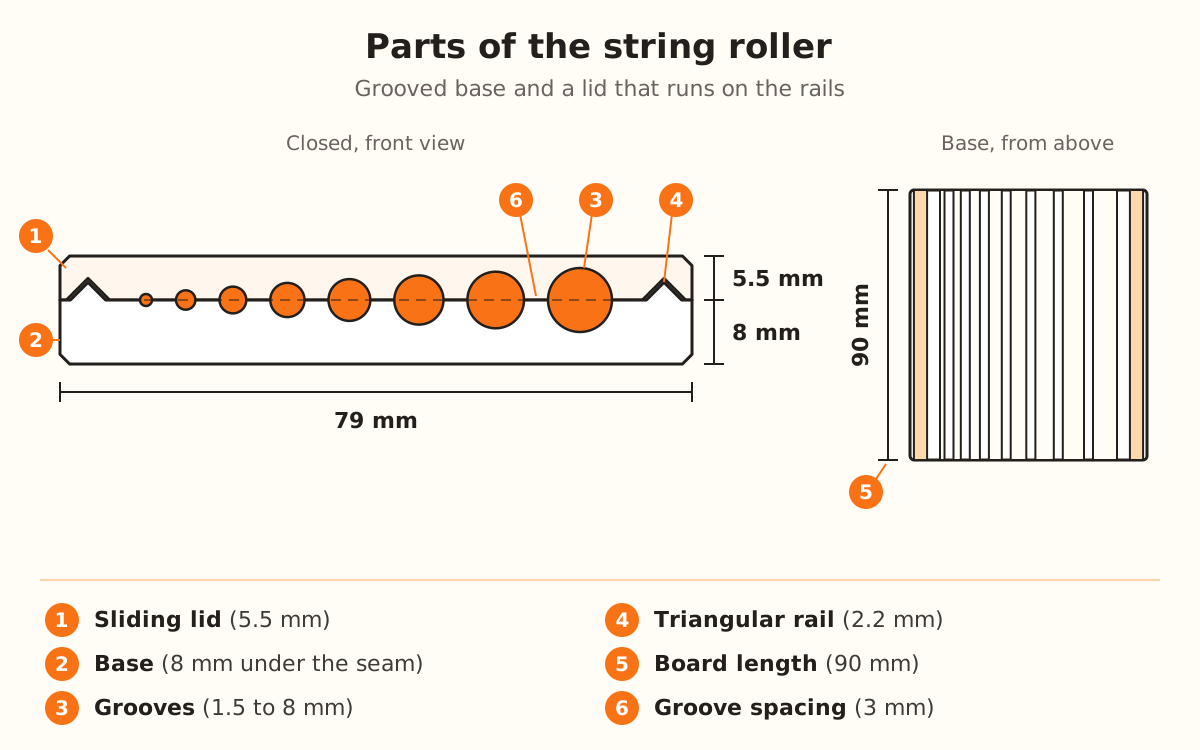
Cross-section of the closed string roller: 8 mm base and 5.5 mm lid, 79 mm wide, eight grooves from 1.5 to 8 mm and a triangular rail on each side; beside it, the base seen from above, 90 mm long.
Base and lid carry the same grooves facing each other: when you slide the lid, the clay comes out the groove's diameter.
1

Open the String Roller

In the product picker it's under “Custom”, with the STUDIO label: designing it and seeing it in the preview needs no plan, but to download it you need the Studio plan.

It doesn't use an image: with this guide's button the designer opens straight to the settings. The “Parameters” panel shows in full in any mode of “How much do you want to adjust?”.

2

Set up the board

Under “Dimensions”, “Board length” starts at 90 mm (from 40 to 150): it's how far each groove runs, that is, the longest string you can make.

“Base thickness” starts at 4 mm (from 1.5 to 10): it's the plastic left under the deepest groove.

3

Set up the lid

“Include sliding lid” is on by default. Turn it off if you only want the base.

With the lid on, “Lid thickness” shows up, 5 mm (from 3 to 12), along with “Fit clearance”, 0.35 mm (from 0.1 to 1): the play between the lid and the rails.

4

Choose the grooves

Under “Grooves”, “Number of grooves” starts at 8 (from 2 to 14) and “Groove spacing” at 3 mm (from 1 to 8).

“Cavity shape” is the piece's silhouette: “Round” (the default), “Diamond”, “Lentil”, “Barrel”, “Cone / planter”, “Teardrop” or “Square”.

With “Same size channels” off, you choose “Smallest groove”, 1.5 mm (from 0.5 to 5), and “Largest groove”, 8 mm (from 2 to 12). With it on, they all measure the “Channel diameter”: 6 mm (from 1 to 20).

5

Download and print

The base and the lid come in the same file, side by side with the seam facing up: they print together and without supports. In the preview, the base shows beige and the lid blue.

You need a filament 3D printer (FDM) and PLA or PETG filament.

6

Shape strings and beads

Lay a small roll of polymer clay or cold porcelain in the groove, set the lid on top with its grooves over the base's, and slide it back and forth.

Lift the lid to take out the piece and cut the strings with a blade.

Quick tips
The lid never comes out thinner than the radius of the largest groove plus 1.5 mm: with an 8 mm groove it measures 5.5 mm, even if “Lid thickness” says 5.
Each shape takes up a different width per groove: “Lentil” 0.45 times the diameter, “Cone / planter” 0.9, “Barrel” 1.3 and “Teardrop” 1.4. With “Barrel” or “Teardrop” the board comes out wider.
To make lots of identical beads, turn on “Same size channels”: all the grooves measure the same.
More “Groove spacing” makes the board wider and sturdier.
If your printer prints tight, raise the “Fit clearance” until the lid slides without forcing it.
ParameterDefaultRange
Board length90 mm40-150 mm
Base thickness4 mm1.5-10 mm
Include sliding lidOnOn / off
Lid thickness5 mm3-12 mm
Fit clearance0.35 mm0.1-1 mm
Number of grooves82-14
Cavity shapeRound7 shapes
Same size channelsOffOn / off
Smallest groove1.5 mm0.5-5 mm
Largest groove8 mm2-12 mm
Channel diameter (same size)6 mm1-20 mm
Groove spacing3 mm1-8 mm
MeasurementDefaultComes from
Board width79 mmGrooves, “Groove spacing” and rails
Base under the seam8 mm“Base thickness” + radius of the largest groove
Lid5.5 mmThe larger of “Lid thickness” and the largest radius + 1.5 mm
Rail4.4 mm at the base, 2.2 mm tallFixed, 45° sides

Strings not coming out right: what to change first

The lid slides stiffly
Raise the “Fit clearance” or lightly sand the rails
The lid wobbles sideways
Lower the “Fit clearance”
The string comes out short
Raise “Board length”, up to 150 mm
The board comes out too wide
Lower “Number of grooves” or “Groove spacing”, or use a narrower shape
The lid comes out thicker than you asked for
That's normal with large grooves: lower “Largest groove”
You want a single thickness
Turn on “Same size channels”

Troubleshooting

The lid slides stiffly or won't go on
Cause: Your printer prints tight and the “Fit clearance” isn't enough.
Fix: Raise the “Fit clearance” (it starts at 0.35 mm, up to 1 mm) and reprint the lid: the base doesn't change.
If it persists: Lightly sand the base's rails.
The lid wobbles and the string comes out uneven
Cause: There's too much play between the lid and the rails.
Fix: Lower the “Fit clearance” little by little, from 0.35 mm toward 0.1 mm.
If it persists: The clearance only changes the lid: reprint the lid, the base stays the same.
The lid comes out thicker than the “Lid thickness”
Cause: The lid is never thinner than the radius of the largest groove plus 1.5 mm, so the groove fits.
Fix: With an 8 mm groove, the lid measures 5.5 mm: that's expected.
If it persists: If you want it thinner, lower “Largest groove” (or the “Channel diameter”, if they're all the same size).
The board comes out wider than I expected
Cause: The width adds up each groove, the space between them and a rail on each side; “Barrel” and “Teardrop” take up more width per groove.
Fix: Lower “Number of grooves” or “Groove spacing”.
If it persists: Pick a narrower shape, like “Lentil”, or lower the diameters.
I don't see “Smallest groove” or “Largest groove”
Cause: “Same size channels” is on: then they all measure the “Channel diameter”.
Fix: Turn off “Same size channels” to go back to graduated grooves.
If it persists: If you don't see “Lid thickness” or “Fit clearance”, turn on “Include sliding lid”.
Only the base comes out, no lid
Cause: “Include sliding lid” is off.
Fix: Turn it on: the lid comes back in the same file, next to the base.
If it persists: Check in the slicer that the file has two pieces: base and lid.
I can't download the roller
Cause: The String Roller has the STUDIO label.
Fix: Downloading it requires the Studio plan.
If it persists: Designing it and seeing it in the preview needs no plan: you can build it before deciding.

Frequently asked questions

Do I need to upload an image?
No. The String Roller doesn't use an image: the length, the grooves and the lid are chosen in the panel.
Does it make strings or beads?
Both: the lid leaves a string or sphere of the groove's exact diameter. With “Cavity shape” you choose the silhouette: sphere, diamond, lentil, barrel, planter, teardrop or tube.
How long does the string come out?
Up to the “Board length”: 90 mm by default, from 40 to 150 mm.
What do I print it with and what clay do I use?
With a filament printer (FDM), in PLA or PETG. It's used with polymer clay or cold porcelain.
Which plan do I need?
The Studio plan to download it. Designing it and seeing it needs no plan.

Ready to make yours?

Upload your image and get a print-ready STL in seconds.

Create my string roller →

Keep reading

Bead mold →3D texture roller →Print settings by product →Best filaments for each product →
KingsCutter

The most complete 3D cutter generator. Designed for bakers, available in 15 languages.

Quick contact
Product
  • 3D Editor
  • Tools
  • Library
  • Pricing
  • How it works
  • Gallery
Services
  • Get a quote
  • For sellers
  • Affiliates
  • Blog
Legal
  • Terms
  • Privacy
  • Refunds
  • Comparison
  • FAQ
  • Contact

© 2026 KingsCutter · Made for bakers around the world

kingscutter