Bead mold
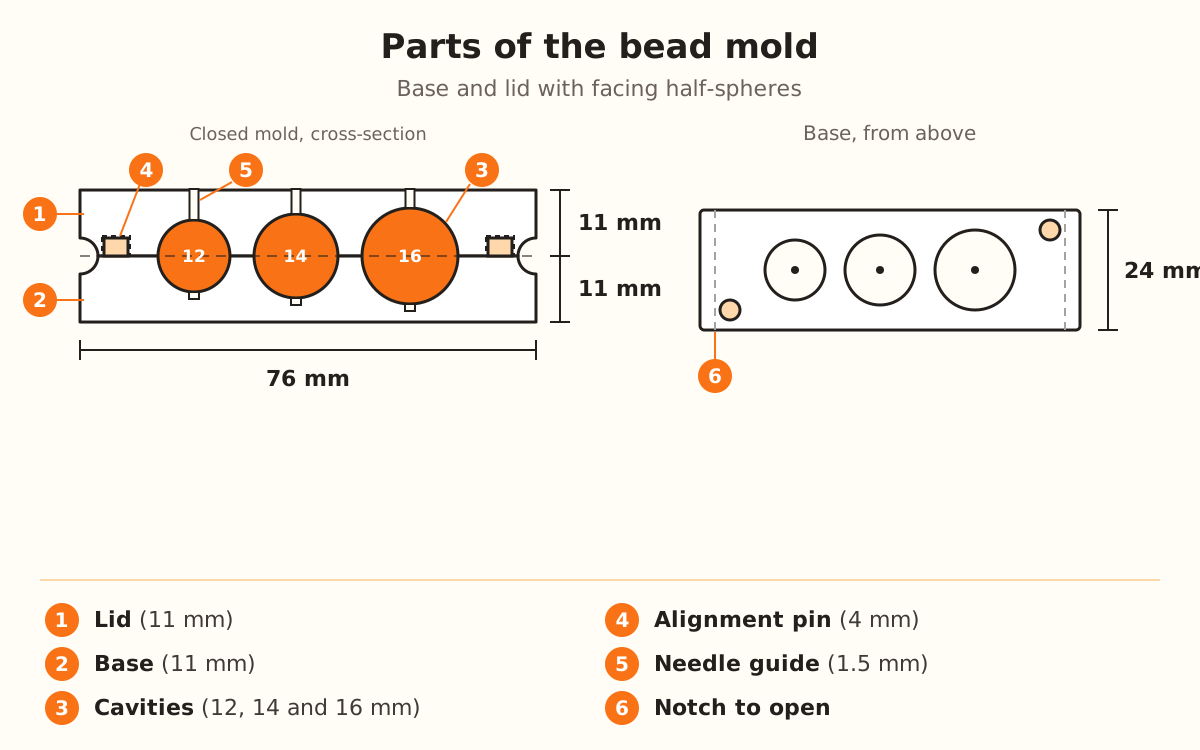
The Bead mold is two blocks, base and lid, with facing half-spheres: drop in a ball of clay, close, press and out comes a round bead. By default it has 3 cavities of 12, 14 and 16 mm, with alignment pins and a needle guide.
What the generator does and doesn't do
- Carves the same row of half-spheres into both blocks: 3 by default, of 12, 14 and 16 mm, with the sizes spread evenly between the smallest and the largest bead
- Adds two 4 mm pins at opposite corners of the base and their holes in the lid, with 0.25 mm of clearance per side, so the halves don't shift when you press
- Opens a 1.5 mm needle guide through the lid to each cavity, and a blind hole under each cavity of the base
- Engraves each cavity's diameter on both long sides of each block and cuts a notch at each end to pry the mold open
- Delivers the base and the lid in the same file, cavities facing up, to print without supports
- →Always putting the same amount of clay in each cavity, so it doesn't overflow at the seam
- →Piercing the bead: the guide marks the spot, and you supply the needle or toothpick
- →Choosing the sizes: this product doesn't use your image, everything is set from the panel
How the mold works
Each cavity is a sphere centered right on the parting face: the base holds the bottom half and the lid the top half. When you close it, the two half-spheres form the whole bead.
The block grows with the cavities. The width is the largest bead plus twice the “Wall” (16 + 2 × 4 = 24 mm) and the height is half the largest bead plus the “Base” (8 + 3 = 11 mm). With the default values, each block measures 76 × 24 × 11 mm and the closed mold is 22 mm tall.
The pins sit at opposite corners, so the lid fits in only one position. The lid's numbers are engraved rotated: with the mold closed they read upright, above the ones on the base.
Open the Bead mold
In the product picker it's under “Custom”, with the STUDIO label: designing it and seeing it in the preview needs no plan, but to download it you need the Studio plan.
It doesn't use an image: with this guide's button the designer opens straight to the settings. The “Parameters” panel shows in full in any mode of “How much do you want to adjust?”.
Choose the beads
Under “Bead cavities”, “Number of cavities” starts at 3 (from 1 to 12). “Smallest bead” starts at 12 mm (from 4 to 40) and “Largest bead” at 16 mm (from 4 to 60).
With more than one cavity, the sizes in between are spread evenly between the smallest and the largest. With just one, the cavity uses the “Largest bead”.
Adjust the mold
Under “Mold”, “Wall” is the material between one cavity and the next and around the row: 4 mm (from 2 to 10). “Base” is what's left under the deepest cavity: 3 mm (from 1.5 to 8).
“Alignment pin” starts at 4 mm (from 0 to 8; at 0, no pins) and “Needle guide” at 1.5 mm (from 0 to 3; at 0, no hole). “Engraved numbers” is on by default.
Download and print
The base and the lid come in the same file, side by side with the cavities facing up: they print together and without supports. In the preview, the base shows beige and the lid blue.
You need a filament 3D printer (FDM) and PLA or PETG filament.
Shape the beads
Put a ball of polymer clay or cold porcelain in each cavity of the base. Flip the lid over, fit the holes onto the pins, close and press.
Push the needle or a toothpick through the guide in the lid to leave the bead's hole. To open it, use the notch at the ends.