String Roller
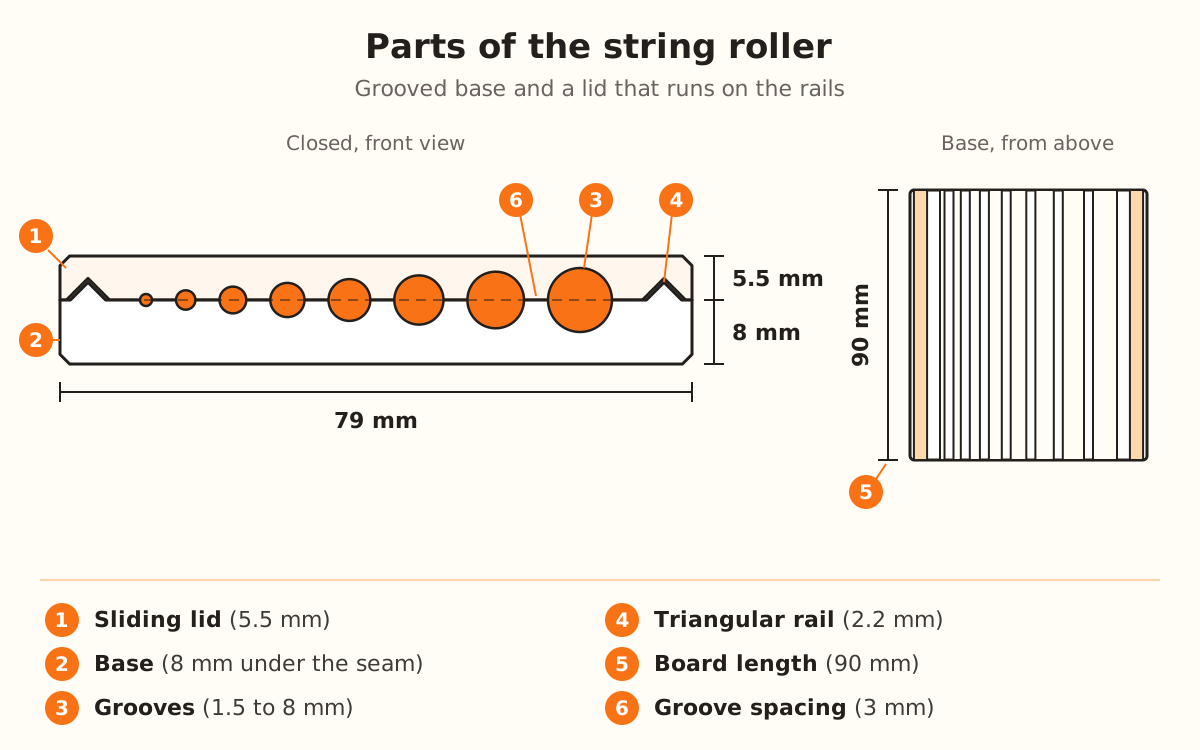
The String Roller is a grooved base with a lid that runs along its rails: lay clay in a groove, slide the lid and out comes a string or bead the groove's diameter. It has 8 grooves, from 1.5 to 8 mm.
What the generator does and doesn't do
- Builds a 90 mm long base with 8 grooves, from 1.5 to 8 mm by default, spread evenly from smallest to largest, or all the same with “Same size channels”
- Adds a sliding lid with the same grooves facing them, running on two triangular rails with 45° sides
- Leaves a “Fit clearance” of 0.35 mm between the lid and the rails, the same on both sides
- Changes the piece you get with “Cavity shape”: 7 shapes, from sphere to teardrop
- Delivers the base and the lid in the same file, seam facing up, to print without supports
- →Laying a small roll of clay in the groove and sliding the lid back and forth
- →Cutting the strings to the length you want: you need a blade for that
- →Lightly sanding the rails if the lid slides stiffly
- →Choosing the sizes: this product doesn't use your image, everything is set from the panel
How the roller works
The base and the lid are one profile stretched along the board. Each groove is one half of the piece and the lid carries the other half facing it: when you slide the lid over the clay, the two close around it and it comes out in the groove's shape.
With the default values, the 8 grooves measure 1.5, 2.4, 3.4, 4.3, 5.2, 6.1, 7.1 and 8 mm, with 3 mm between them. The board comes out 79 mm wide: 65 mm of grooves and a 7 mm rail on each side.
The rails are triangles 2.2 mm tall: they center the lid sideways and let you lift it to take out the piece, without sliding it all the way to the end. Under the seam, the base measures 8 mm: the 4 mm of “Base thickness” plus the radius of the largest groove.
Open the String Roller
In the product picker it's under “Custom”, with the STUDIO label: designing it and seeing it in the preview needs no plan, but to download it you need the Studio plan.
It doesn't use an image: with this guide's button the designer opens straight to the settings. The “Parameters” panel shows in full in any mode of “How much do you want to adjust?”.
Set up the board
Under “Dimensions”, “Board length” starts at 90 mm (from 40 to 150): it's how far each groove runs, that is, the longest string you can make.
“Base thickness” starts at 4 mm (from 1.5 to 10): it's the plastic left under the deepest groove.
Set up the lid
“Include sliding lid” is on by default. Turn it off if you only want the base.
With the lid on, “Lid thickness” shows up, 5 mm (from 3 to 12), along with “Fit clearance”, 0.35 mm (from 0.1 to 1): the play between the lid and the rails.
Choose the grooves
Under “Grooves”, “Number of grooves” starts at 8 (from 2 to 14) and “Groove spacing” at 3 mm (from 1 to 8).
“Cavity shape” is the piece's silhouette: “Round” (the default), “Diamond”, “Lentil”, “Barrel”, “Cone / planter”, “Teardrop” or “Square”.
With “Same size channels” off, you choose “Smallest groove”, 1.5 mm (from 0.5 to 5), and “Largest groove”, 8 mm (from 2 to 12). With it on, they all measure the “Channel diameter”: 6 mm (from 1 to 20).
Download and print
The base and the lid come in the same file, side by side with the seam facing up: they print together and without supports. In the preview, the base shows beige and the lid blue.
You need a filament 3D printer (FDM) and PLA or PETG filament.
Shape strings and beads
Lay a small roll of polymer clay or cold porcelain in the groove, set the lid on top with its grooves over the base's, and slide it back and forth.
Lift the lid to take out the piece and cut the strings with a blade.