KingsCutter
  • Library
  • Get a quote
  • Pricing
  • Calculator
  • Tutorials
Sign inStart free
Guides›Sell your designs on Cults3D, step by step
SELL 6 minUpdated: October 2026

Sell your designs on Cults3D, step by step

Quick answer

With the Studio plan, create an API key in your Cults3D account, paste it in My Studio → My stores along with your username and, from the designer, “Publish to my store” puts your piece's STL on sale.
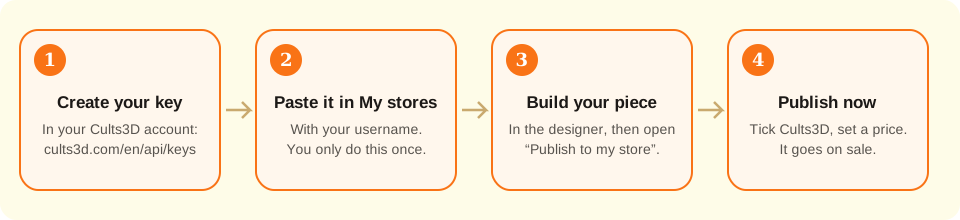
Four steps in a row: create the key on Cults3D, paste it in My stores, build the piece in the designer and tap Publish now.
You create and connect the key only once; after that, each piece is published from the designer.

What the site does and what you do

Handled by the site
  • Checks with Cults3D that your username and key work before saving them, and stores the key encrypted in your account
  • Uploads to Cults3D the same STL file “Download” gives you, already oriented for printing
  • Builds the photos of the piece with “Photo to sell” and, if you ask for it, the finished-cookie photo with AI (1 credit)
  • Writes the title, description and tags with AI in your language, if you ask for it (1 credit)
  • Picks the Cults3D category based on the product (for example, kitchen for a cutter)
  • Sets the “Private Use” license: buyers print it for themselves and can't resell the file
→ Up to you
  • →Having a Cults3D account and creating the key there: the site can't do it for you
  • →The price: you decide it, in euros, from €0.50
  • →Getting paid for sales: how and when Cults3D pays you is in your account there
  • →Editing or deleting the listing after publishing: that's done from your Cults3D account
  • →Having the right to sell the drawing: characters and brands usually have an owner

What an API key is, in plain words

Cults3D is a store of files for 3D printing: people buy the STL and print it at home. What you build in the designer is exactly that, an STL, so you can sell it there.

Etsy or Shopify connect with a button that takes you to their page to grant permission. Cults3D has no such button. Instead it lets you create an “API key”: a long piece of text that works like a spare key to your account, meant for programs like KingsCutter.

With that key, the site can upload designs to your Cults3D account. Your Cults3D password is never typed here and we never see it. The key is stored encrypted, and you can cut it off whenever you want: by disconnecting Cults3D in My stores and deleting the key on Cults3D.

The username is your name on Cults3D, the one at the end of your profile's address: in cults3d.com/en/users/AnnaBakes, the username is AnnaBakes. It isn't your email.

Connecting Cults3D is part of the Studio plan, like all of “Publish to my store”.
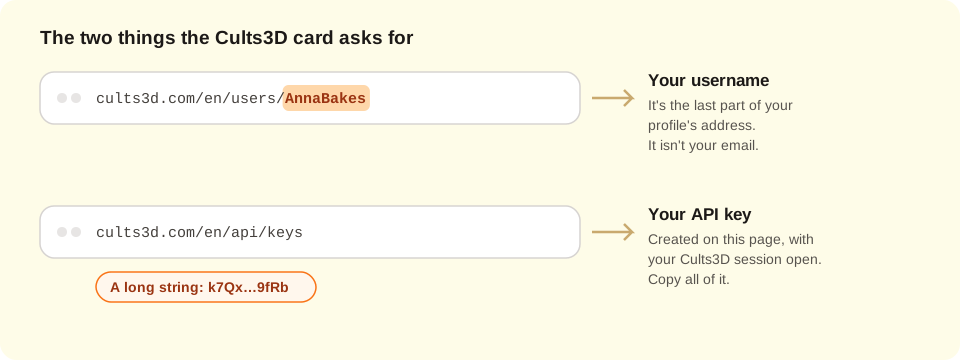
Two browser address bars: the Cults3D profile, which ends with the username, and the page where the API key is created.
The username comes from your profile's address; the key, from cults3d.com/en/api/keys with your session open.
1

Get your Cults3D account ready

If you don't have a Cults3D account yet, create one at cults3d.com. How and when Cults3D pays you for sales is set up in your account there.

Log in to Cults3D in the same browser you use for KingsCutter: the next steps go faster that way.

2

Find your username

Open your profile on Cults3D and look at the address at the top of the browser. It ends with your username: in cults3d.com/en/users/AnnaBakes, the username is AnnaBakes.

Write it down exactly as it is, with its capital and lowercase letters. You'll paste it in step 4.

3

Create your API key

With your Cults3D session open, go to cults3d.com/en/api/keys. You can also get there with the “Create my key on Cults3D” link on the Cults3D card, in My stores.

Create a new key. If Cults3D lets you name it, type “KingsCutter” so you recognize it later.

If it offers a read-only key, don't pick it: with that one you can connect, but not publish.

Copy the whole key. It's a long string of letters and numbers; if a piece is left out, it won't work. Treat it like a password: whoever has it can upload designs to your account.

4

Connect it in My stores

On KingsCutter, go to My Studio → My stores and find the Cults3D card. Paste your username in “Your Cults3D username” and the key in “Your Cults3D API key”. Tap “Connect”.

The site asks Cults3D whether the key works. If it does, “Done: Cults3D is connected” shows up at the top and you see it under “Connected stores”. If not, the card tells you what to check.

You only do this once. After that, you just publish.

5

Build your piece in the designer

Design as usual: upload the image, pick the product and adjust the measurements. Once the piece is generated, “Publish to my store · Studio” shows up under “Selling in volume”. Open it.

6

Pick Cults3D and write the listing

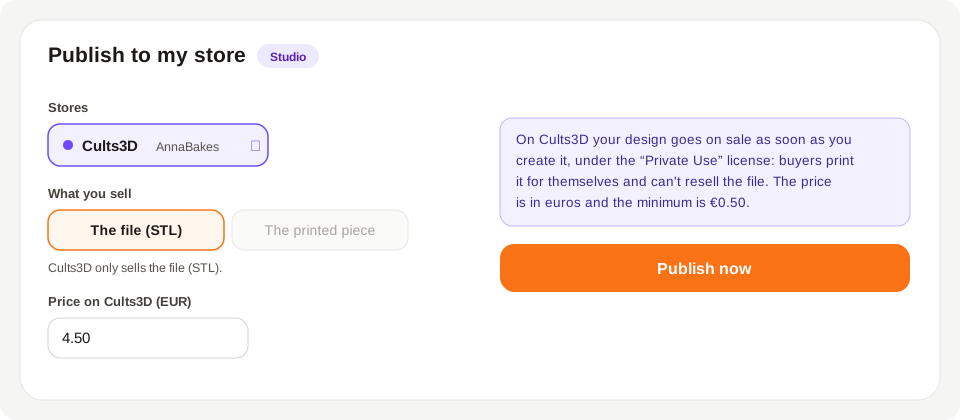
Under “Stores”, tick Cults3D. “What you sell” stays on “The file (STL)”: Cults3D only sells files.

Enter the price in euros, from €0.50.

You write the title, description and tags yourself, or ask the AI with “Write with AI” (1 credit). On the right, the preview shows how the listing will look.

Choose the photos: the three from “Photo to sell” come on their own; the finished-cookie photo with AI is optional.

If you tick Cults3D together with Mercado Libre, the button turns off: Mercado Libre only sells the printed piece and Cults3D only the file. Publish on one first and then on the other.

7

Read the notice and tap “Publish now”

Before the button there's a notice in a box: on Cults3D the design goes on sale as soon as you create it, under the “Private Use” license. Cults3D has no drafts, so check everything before tapping the button.

Tap “Publish now”. First you'll see “Uploading the file…” (the STL goes up in parts) and then the result: “Done: your design is now on sale”, with the “View listing” button.

If you ticked other stores besides Cults3D, a draft is created in those, as usual.

8

After publishing

Tap “View listing” and check the text, photos and file on Cults3D. If you want to change something, do it from your Cults3D account: the site doesn't edit listings already created.

In My stores, under “Latest listings”, each publication stays with its link.
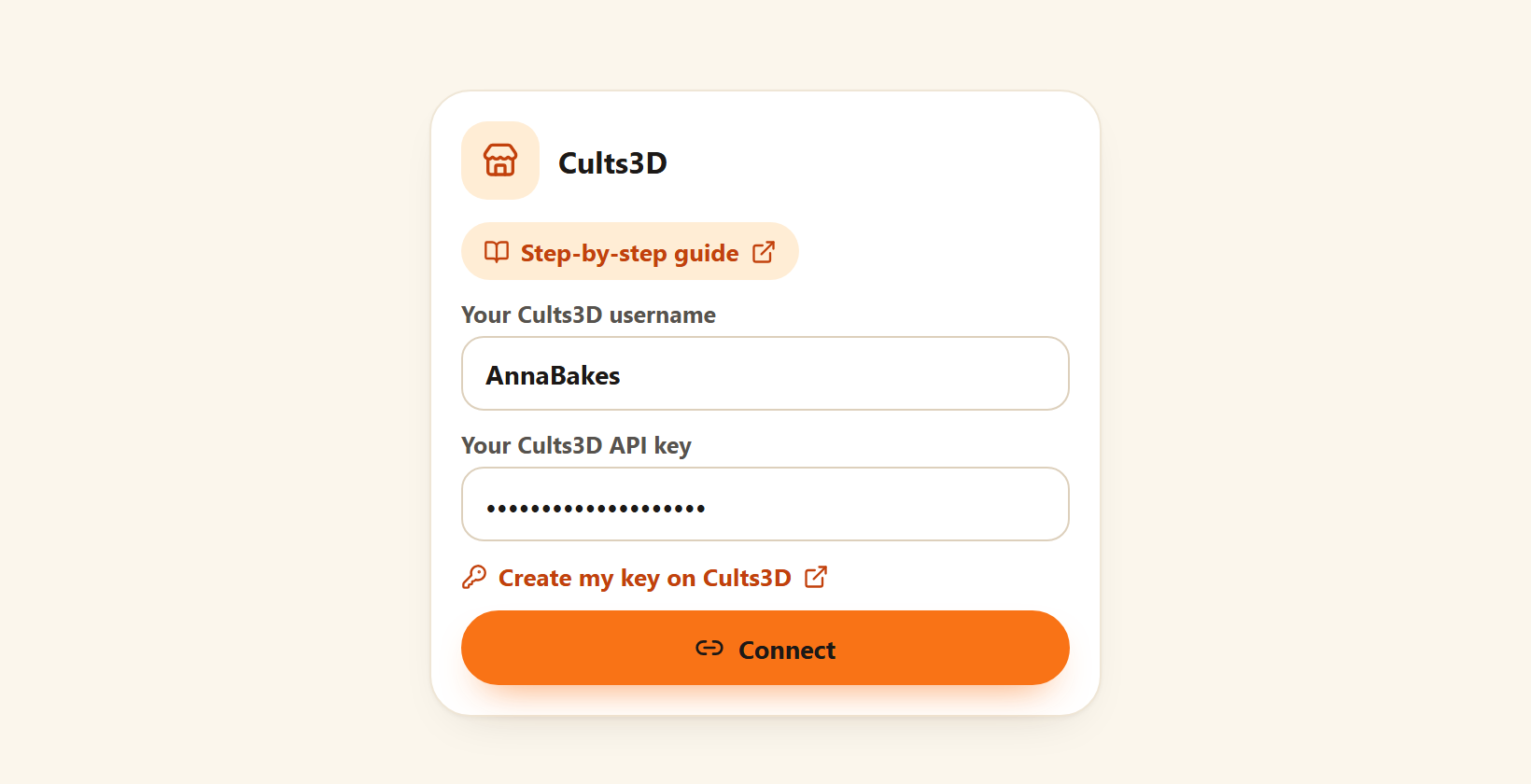
The Cults3D card in My stores with the Your Cults3D username and Your Cults3D API key fields filled in, the link to create the key and the Connect button.
This is the Cults3D card in My Studio → My stores: paste both and tap “Connect”.
The Publish to my store window with Cults3D ticked, the STL file as what you sell, the price in euros, the notice that it goes on sale and the Publish now button.
With Cults3D ticked, the window warns in a box that the design goes on sale and the button says “Publish now”.
Quick tips
Do a first test with a simple design: that way you see how your listing looks on Cults3D before uploading your whole catalog.
A title that starts with what people search for (“Dog paw cookie cutter”) gets found more easily than one that starts with your brand.
Name the key “KingsCutter” on Cults3D: if you ever want to cut off access, you'll know which one to delete.
If you change the piece, publish it again: the site doesn't replace the file of a listing already created.
Cults3D is used in many countries: a few tags in English, besides the ones in your language, help people find you.
Only sell drawings that are yours or that you have permission to sell.
What it asks forWhere to find itExample
Your Cults3D usernameAt the end of your profile's address on Cults3DAnnaBakes
Your API keycults3d.com/en/api/keys, with your Cults3D session openA long string of letters and numbers
The priceYou decide it, in eurosFrom €0.50
What reaches Cults3DWhere it comes from
Title, description and tagsWhat you wrote or asked the AI for (title up to 100 characters, up to 20 tags)
PhotosThe ones you ticked, up to 4
STL fileThe same one “Download” gives you, already oriented for printing
CategoryPicked by the site based on the product (for example, kitchen)
License“Private Use”: buyers print it for themselves and don't resell the file
Listing languageThe site's, if it's Spanish, English, French, German, Italian or Portuguese; otherwise, English

If something didn't go as expected

The Cults3D card says “Soon”
Cults3D isn't enabled on the site yet: write to us from Support
The card says “Studio” and won't let you type
Connecting Cults3D is part of the Studio plan
“Cults3D didn't accept that username and key”
Check that the username is the one on your profile (not your email) and that you copied the whole key; if it persists, create a new key
“Enter your Cults3D username and key”
One of the two is missing, or the key ended up with spaces in the middle: paste it again
“Publish now” is disabled
Check that there's a title, a description, at least one photo and a price of €0.50 or more, and that Mercado Libre isn't ticked together with Cults3D
“The minimum price on Cults3D is €0.50”
Raise the price to €0.50 or more
“The STL file couldn't be uploaded”
Try again; if it persists, generate the piece again
“Cults3D no longer accepts your key”
You deleted or changed it on Cults3D: disconnect Cults3D in My stores and connect it with a new key

Troubleshooting

Cults3D doesn't accept my username and key
Cause: The username isn't the one on your profile (for example, you typed your email) or the key got cut off when copying it.
Fix: Copy the username from the end of your profile's address and copy the whole key again from cults3d.com/en/api/keys.
If it persists: Create a new key on Cults3D, delete the old one and connect with the new one.
It connected fine, but when publishing it says Cults3D doesn't accept my key
Cause: The key was deleted or changed on Cults3D, or it's read-only: it works to connect, but not to publish.
Fix: Disconnect Cults3D in My stores, create a new key that isn't read-only and connect it.
If it persists: Write to us from Support with the date and time of the attempt.
I can't find where to create the key
Cause: The Cults3D keys page only shows up with your Cults3D session open.
Fix: Log in at cults3d.com and go to cults3d.com/en/api/keys, or use the “Create my key on Cults3D” link on the card.
If it persists: If the page doesn't load, try another browser or write to Cults3D support.
Cults3D didn't accept the design
Cause: Cults3D checked the listing and returned a reason, for example a title that's too short or missing information.
Fix: Read the reason shown next to Cults3D in the result, tap “Go back and fix”, fix that field and publish again.
If it persists: Write to us from Support with the text of the reason.
The STL file couldn't be uploaded
Cause: The connection dropped while the file was uploading, or the piece hadn't finished generating.
Fix: Wait until the piece shows complete in the viewer and tap “Publish now” again.
If it persists: If the file is over 60 MB it can't be uploaded from here: lower the piece's detail or upload it by hand on Cults3D.
It says there were too many attempts in a row
Cause: Cults3D limits how many times a day a key can be used, and the site limits publications per hour.
Fix: Wait a while and try again.
If it persists: If you publish many designs, spread them over several days.
I want to cut off access to my Cults3D account
Cause: The key stays active on Cults3D even if you disconnect it here.
Fix: Disconnect Cults3D in My stores (the site deletes the key) and delete it too at cults3d.com/en/api/keys.
If it persists: Without the key, the site can no longer upload anything to your account.
I published by mistake
Cause: Cults3D has no drafts: the design goes on sale as soon as it's created.
Fix: Go to your Cults3D account and deactivate or delete the design from there.
If it persists: If you can't find it, write to us from Support with the listing's link.

Frequently asked questions

Is it safe to give the site my key?
The key is stored encrypted and only used to upload the designs you publish. Your Cults3D password is never typed here. You can cut it off whenever you want: disconnect Cults3D in My stores and delete it on Cults3D.
How much does it cost?
Connecting Cults3D and publishing uses no credits. The AI, if you ask for it, costs 1 credit per text and 1 for the cookie photo. The commission Cults3D keeps on each sale is decided by Cults3D and you see it in your account there.
Which license does my design get?
“Cults - Private Use”, Cults3D's default: buyers print it for themselves and can't resell the file.
In which currency is it sold?
In euros, with a minimum of €0.50.
Does it publish on its own?
Only when you tap “Publish now”. Cults3D has no drafts: it goes on sale at that moment, which is why the window warns you first.
Can I sell the printed piece on Cults3D?
No: Cults3D sells files. To sell the printed piece, use Etsy, Mercado Libre, Shopify or Nuvemshop from the same window.
Can I publish a design for free?
Not from the site: the price is required. If you want to share a design for free, upload it by hand on Cults3D.
Can I connect more than one Cults3D account?
Yes: each account, with its username and key, shows up as a separate store in My stores, and in the window you choose which one to publish to.
What happens if I disconnect Cults3D?
The site deletes the key. Designs you already published stay on sale on Cults3D.

Ready to sell on Cults3D?

Connect your account once and publish each piece from the designer.

Connect Cults3D →

Keep reading

Publish to your store from the designer →How to create your first cutter →Print settings →
KingsCutter

The most complete 3D cutter generator. Designed for bakers, available in 15 languages.

Quick contact
Product
  • 3D Editor
  • Tools
  • Library
  • Pricing
  • How it works
  • Gallery
Services
  • Get a quote
  • For sellers
  • Affiliates
  • Blog
Legal
  • Terms
  • Privacy
  • Refunds
  • Comparison
  • FAQ
  • Contact

© 2026 KingsCutter · Made for bakers around the world

kingscutter